
Pro-Tec Design Announces Planned Transition of CEOs
 [Minnetonka, MN, 5-15-23] – Pro-Tec Design, a leading provider of innovative security technology integration solutions, is pleased to announce a planned transition of its chief executive officer (CEO) position. After a successful tenure, Ms. Eva Mach will be stepping down as CEO, and Mr. Dave Benson will assume the role effective May 15, 2023. This transition represents a strategic decision to ensure the company's continued growth and success.
Ms. Mach has been instrumental in Pro-Tec Design's journey, providing visionary leadership and driving the company from privately held to employee-owned through an ESOP, instituting a major cultural pivot transitioning employees to operate as owners. "It has been an honor to lead a team of talented and dedicated individuals through the first years as a 100% employee-owned company. With David Benson coming on board, the future of Pro-Tec Design is in excellent hands." As a Strategic Executive Advisor, Ms. Mach will remain with the company during the transition period, offering her expertise and guidance to ensure a seamless handover.
Taking the helm as CEO, Mr. Dave Benson brings a wealth of experience and a proven track record of success in the security and systems integration industry. With over 25+ years of experience, Mr. Benson has spearheaded numerous strategic initiatives and achieved substantial business growth for organizations in our industry. His deep understanding of the systems integration industry and strong leadership skills make him the ideal candidate to lead Pro-Tec Design into its next phase of growth and innovation.
"I am excited to join the Pro-Tec Design team! I believe, especially in security integrations, that people are paramount," said Mr. Benson. "Pro-Tec's reputation for excellent people and excellent results is second to none. I look forward to meeting all of my new colleagues, learning about what their passions are, developing strong relationships, and growing our company with innovative solutions and technologies."
The board of directors and the entire Pro-Tec Design team express their appreciation for Mrs. Mach's outstanding contributions and leadership during her tenure as CEO. They are confident that Mr. Benson will bring fresh perspectives and drive the company forward, building upon the strong foundation established by his predecessor.
###
About ProTec Design
Pro-Tec Design is a client focused and technology driven security integrator providing consulting, design, and installation of Video Surveillance, Card Access Control, Intercom, and Intrusion systems. We use technology to protect an organization’s people, data, and assets – keeping business continuity, security procedures, and policies on track during a myriad of unforeseen events.
Through our certified partner network of Lenel, Milestone, Avigilon, Axis, Bosch, Exacq, Feenics, Honeywell, Lenel, and Milestone, PTD specializes State and Local Government entities, healthcare, manufacturing, K-12 and Higher education. As a member of ASIS International, ESA, IAHSS, NSCA, PSA Security Network, & Security-Net Partner, PTD is dedicated to Making Our World Safer.
Eva Mach Recognized as Part of the Security Industry Association’s 2023 Women in Security Forum Power 100
Eva was highlighted in this annual program showcasing 100 women who are role models, leaders, innovators and influencers in the global security industry.
 SILVER SPRING, Md. – The Security Industry Association (SIA) has named Eva Mach, President, CEO and Employee Owner of Pro-Tec Design to the 2023 honoree list for the SIA Women in Security Forum Power 100. This initiative, presented by the SIA Women in Security Forum, honors 100 women in the security industry each year who are role models for actively advancing diversity, inclusion, innovation and leadership in the community.
Eva brought her 20 years of industry experience to Pro-Tec in 2010. Beginning as the company’s CFO, she assumed the role of President and CEO in 2016. A champion of creating a high-level, focused vision, promoting a dynamic culture and staying ahead of industry and market changes, Eva is leading the company into its next phase. As the security industry rapidly transforms from physical to virtual, Eva is responsible for guiding the short and long-term strategic planning. Under her guidance, she has assembled a strong leadership and operations team that focuses on protecting their clients’ business and security needs with the latest industry technology.
Since her arrival, she has taken the company from privately held to employee-owned through an ESOP, instituting a major cultural pivot transitioning employees to operate as owners. To drive the cultural and growth shifts associated with employee ownership, she implemented EOS Traction to build management team capacity and promote accountability throughout the organization.
Eva serves as the ultimate decision making and point person on strategic initiatives including products, services and maintaining strategic relationships with Pro-Tec’s key vendors and partners.
Acting as a true open-door CEO, Eva leads the daily charge manifesting Pro-Tec’s vision of Making Our World Safer.
“The SIA Women in Security Forum is proud to showcase the remarkable women of the 2023 WISF Power 100. These dynamic, talented honorees are making waves in the security industry and are constantly exhibiting leadership, motivating others and driving progress in the security industry,” said SIA Women in Security Forum Chair Kasia Hanson. “We commend this outstanding class of honorees for their impactful efforts in the security industry and broader community and look forward to celebrating their successes at ISC West.”
On March 31 at ISC West 2023, the SIA Women in Security Forum will host a networking breakfast and Power 100 celebration recognizing this year’s Power 100 honorees. At this free event sponsored by dormakaba, attendees will connect with other leaders and champions for diversity and help SIA recognize and celebrate the 2023 honorees of the Power 100 program. After the breakfast, attendees are encouraged to stay for the SIA Women in Security Forum keynote with special guest speaker Alison Levine, team captain of the first American Women's Everest Expedition team, faculty member at the Thayer Leader Development Group at West Point and the New York Times bestselling author of On the Edge. Learn more and register to attend here.
The Power 100 announcement comes on March 8, International Women’s Day, a global day celebrating the social, economic, cultural and political achievements of women and presenting a call to action for accelerating women’s equality. SIA supports International Women’s Day and launched the SIA Women in Security Forum on this day in 2018. This year, SIA will celebrate International Women’s Day and its 2023 theme by encouraging the Power 100 honorees, the Women in Security Forum community and the larger security industry to work to forge women’s equity and #EmbraceEquity.
“The 2023 Power 100 honorees are an inspiration to all of us in the security industry. These 100 women leaders are breaking barriers, shifting expectations and advancing diversity, equity and inclusion while taking our industry to new heights,” said SIA CEO Don Erickson. “As we celebrate International Women’s Day, we congratulate this year’s outstanding class of honorees and thank them for their invaluable contributions to the security industry as well as their leadership, innovation and advocacy.”
SIA’s Women in Security Forum works to engage all security professionals to promote, recruit and cultivate women’s leadership for a more inclusive and diversified industry. In addition to the Power 100, the SIA Women in Security Forum offers several programs and activities, including the SIA Progress Award, which celebrates individuals who advance opportunities for women in the security industry; the SIA Women in Security Forum Scholarship, which furthers educational opportunities and advancement for a diverse security workforce; special keynote breakfast events at ISC West and East; volunteer efforts that give back to the community; virtual education offerings; collaborative projects with other organizations seeking to empower women in security and technology; support of the SIA Women in Biometrics Awards; thought leadership and speaking opportunities; and engaging networking and professional growth events. Membership in the SIA Women in Security Forum is free and open to all employees of SIA member companies and SIA student members. Not a SIA member yet? You can still join and will be subscribed to Women in Security Forum news, although you may not receive full member privileges. Learn more and get involved here.
###
About SIA
SIA is the leading trade association for global security solution providers, with over 1,300 innovative member companies representing thousands of security leaders and experts who shape the future of the security industry. SIA protects and advances its members’ interests by advocating pro-industry policies and legislation at the federal and state levels, creating open industry standards that enable integration, advancing industry professionalism through education and training, opening global market opportunities, and collaborating with other like-minded organizations. As the premier sponsor of ISC Events expos and conferences, SIA ensures its members have access to top-level buyers and influencers, as well as unparalleled learning and network opportunities. SIA also enhances the position of its members in the security marketplace through SIA GovSummit, which brings together private industry with government decision makers, and Securing New Ground, the security industry’s top executive conference for peer-to-peer networking.
 SDM Exclusive: State of the Market - All Eyes on the Rise of Video Security
Insiders Address Key Topics for Security Pros to Consider
Eva Mach, Pro-Tech Design | Customer Education
As an industry, we need to do a better job of educating clients on new technology and the applications of these new technologies. As integrators, some of those conversations aren’t natural to us. We are comfortable talking about cameras and frame rates and storage.
We need to better educate the client to serve them as best we can as the technology changes and also be mindful as to whether or not that fits with our client’s policy and procedures internally. I see education as an opportunity to help clients in their business. There is so much data that we collect now at the edge and our customers have a huge opportunity to use that data to improve their business operations.
Planning Ahead - Potential Product Shortages

As most of you are aware, product shortages have impacted nearly every industry this summer. From new cars to laptop computers, companies have struggled to obtain the products they need to keep their businesses operating efficiently or to meet their customer’s needs.
Pro-Tec Design has been relatively fortunate to have not been significantly impacted by these shortages, but we are starting to see pockets of delays in some product lines. Some cameras and credentials have lead times in excess of eight weeks. In some cases, we have been able to obtain a significant forward supply of products, but not for all.
With this in mind, we would like to encourage you work closely with us to plan your future projects or purchases with more lead time then we have all become accustomed to. Items you purchase on a recurring basis (such as additional credentials for your employees) should be ordered 6 to 8 weeks before they are needed, so that you can be sure to have when needed.
Any information you are willing to share with us regarding your future projects will help us prevent any significant delays. Even basic information such as project name, scope (5 readers, 6 cameras), and tentative dates would be a huge help in our mutual success.
Please contact us for any product or project needs. Thank you!
Pro-Tec Receives North Side Community Builder 2021 Award
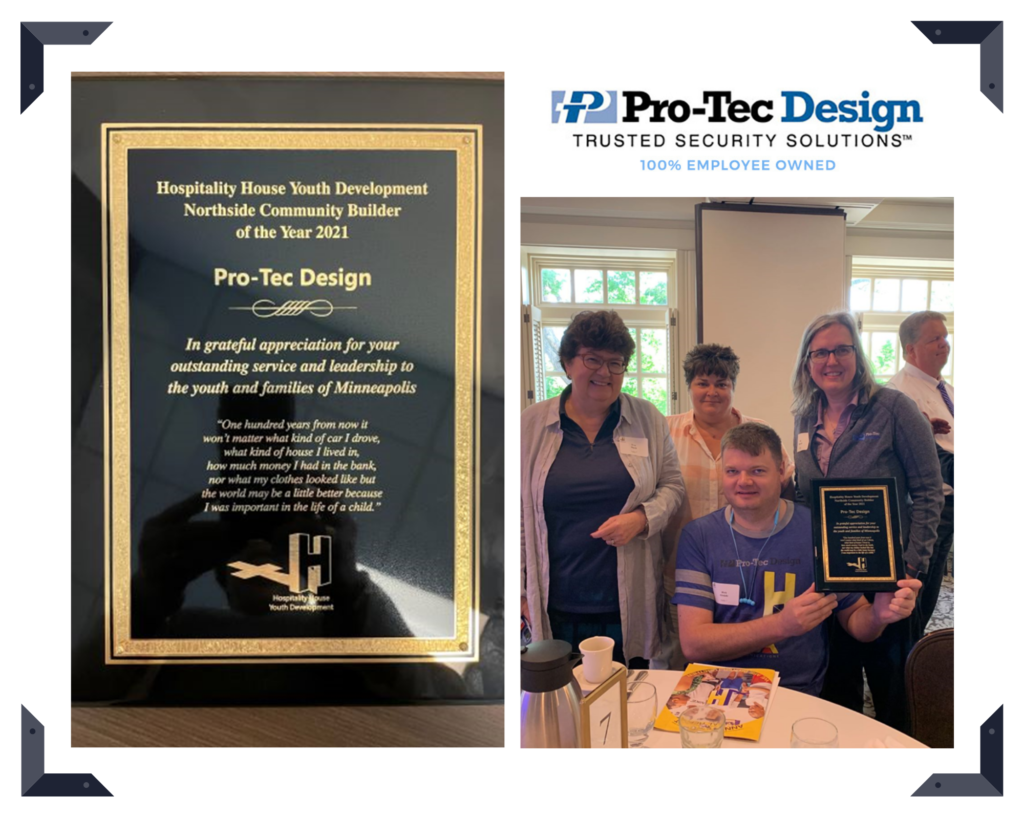
Pro-Tec Design is proud to receive the North Side Community Builder 2021 Award from Hospitality House Youth Development (HHYD). Our employee-owners volunteered their time and financial resources to support HHYD’s mission of opening the doors of opportunity to the youth of the North Minneapolis Community. To learn more about HHYD and the vital work they do: https://hhyd.org
End of Life for Windows Server 7, 2008 & 2008 R2
On January 14, 2020, support for Windows Server 2008 R2, Windows 7 and SQL 2008 will end.
This means there will be no more support or security patches on your server. In order to ensure that your infrastructure and applications do not go unprotected, your IT department will need to update your servers to a supported version.
If you choose not to upgrade, your network may become vulnerable and you run the risk of a potential network breach which could result in a loss of your companies data/assets. Please keep in mind that the server and software manufacturers will no longer provide support if your hardware/software is out-of-date.
STEPS TO TAKE TO PROTECT YOUR NETWORK
- Ensure your IT department updates your server(s) to a supported Operating System and Database that is compatible with your access control or video management software
- Verify you have installed the latest Microsoft Patches
- Confirm your server has been properly updated by scheduling a remote 15-minute session with a Pro-Tec Design technician (Pro-Tec Design will verify if your operating system and database are currently supported and have received the latest security patches)
- Confirm that your access control and/or video software is up-to-date (Pro-Tec Design will verify your Software Support Agreement is up-to-date and schedule an upgrade)
HOW TO SCHEDULE YOUR REMOTE SESSION
- Phone: 763.553.1297
- Email: info@pro-tecdesign.com
- Online: Schedule your assessment online here
Please be sure to schedule your remote session prior to January 14 to make sure your system is up-to-date.
Kirk Simmons Achieves Certified Protection Professional (CPP) Milestone
We celebrate our employee-owner, Kirk Simmons, for upholding his certification of being a Certified Protection Professional (CPP) for over five years. Achieving a CPP is considered the gold standard certification for security professionals and demonstrates knowledge and competency in the seven key domains of security: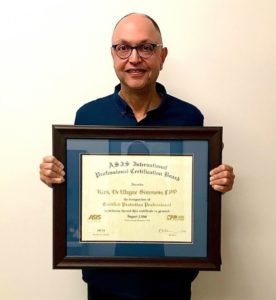
- Security Principles and Practices
- Business Principles and Practices
- Investigations
- Personnel Security
- Physical Security
- Information Security
- Crisis Management
Certified Protection Professionals are recognized globally as the standard of excellence for security management professionals. “I’ve always looked up to those that were CPP certified and knew that I wanted to achieve that goal. I spent over six months studying all the time. Any free moment I had, I dedicated to achieving the goal of obtaining the CPP certificate.” – Kirk Simmons, CPP.
Kirk graduated top of his class, Summa Cum Laude with a B.S. in Criminal Justice Administration at Bellevue University and later went on to receive his master’s in Organizational Leadership. With over 18 years of experience in the security industry, Kirk has taken on the roles of Corporate Loss Prevention Manager and Security Manager at organizations such as Best Buy, Musicland Stores and Hennepin County. In addition to his schooling, Kirk served in the marine corps as a military policeman and was meritoriously promoted three times.
To obtain the CPP certification, one must meet the minimum qualifications established by ASIS International, along with passing the challenging certification exam of over 200 questions that assesses one’s knowledge in all aspects of physical, intellectual and personnel security.
Congratulations Kirk on your five-year milestone as a CPP!